
Workflow automation in business never slows down, even small time gains add up. Think about giving your team space to skip the boring stuff – so they can dive into work that actually moves the needle. This shift? It starts with smart automation. Here’s a look at ten real-world ways to workflow management software and shake up how things get done, whether it’s welcoming newcomers or wrapping up monthly finances. Every tip here works straight out of the gate, fits most teams, and skips the fluff.
What Is Workflow Automation?
Workflow automation uses apps or programs to handle boring, repeated jobs in your company, making things happen on their own without constant oversight. That includes stuff such as signing off on requests, typing in info, sending alerts, passing work around – along with plenty of other routine actions.
Fewer mistakes happen when you automate – tasks finish quicker while your crew gets free to tackle more meaningful stuff.
Beyond merely cutting down hours, setting up automatic processes delivers solid perks you can actually track
Faster results come from workflow automation software instead of hands-on work.
Machines handle jobs the same way every single time – so mistakes from people don’t mess things up.
When your company gets bigger, there’s no need to adjust each task by hand – automation handles it smoothly instead. Growth becomes easier since systems adapt on their own through smart tools rather than constant oversight.
Fewer daily tasks mean sharper attention – so your crew dives into big choices, fresh ideas, or long-term planning instead.
Right now, check out 10 ways to workflow automation – start using them in your work right away. Every example explains what it means, why it’s useful, yet also gives a quick look at how to set it up.
1. Employee Onboarding Automation
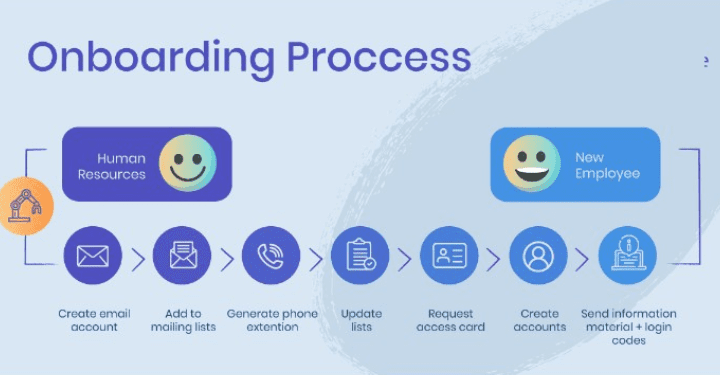
Getting new workers started is key to creating a solid crew. Yet handling every task by hand – like mailing job offers or making logins – eats up hours and usually causes errors. This gap is filled by automating the setup process.
What is Employee Onboarding Automation
Employee onboarding automation is about using tech to take care of admin, learning steps, and updates without manual effort. Rather than managing every step yourself, systems can shoot off messages, gather files, set up lessons, plus follow how each newcomer advances.
Workflow automation cuts down hours, slashes mistakes, so things flow better for staff and HR alike. New joiners get a friendlier start, gain confidence fast – while recruiters handle folks instead of forms.
How It Works
New team members receive instant access to all essentials – contracts, guidelines, login details, or learning tools – via a single hub right from day one. When tasks are due, alerts go out by themselves while progress gets logged without manual input. No step slips through the cracks, whether bringing in one person or ten at the same time.
Main Benefits
The top perks? Quicker start times, a smooth setup for every worker – no matter who they are – and fewer slipups with workplace guidelines. Plus, it boosts how HR chats with newcomers, so they feel at home way sooner.
Real Business Impact
Firms using workflow automation tools when bringing people onboard tend to finish hires faster – also noticing happier staff along with fewer quit rates. This move works well, boosting output while building a tighter team vibe.
Final Thoughts
Staff setup made automatic? That’s not merely swapping old tools for new ones – it shifts how fast-moving companies operate. One thing leads to another: smoother starts, friendlier vibes, fewer hiccups – all around.
2. Lead Capture & Follow-Up Automation

Grabbing leads plus handling them later on can boost your biz – no need to burn time hunting people down. You pull in customer info by itself using sign-up boxes, quick windows, or site pages. When someone checks things out, their details get saved right away while the tool shoots off tailored notes or texts.
This method cuts down on effort while keeping every potential contact engaged. Apps such as HubSpot, ActiveCampaign, or Mailchimp let even beginners get things running fast. Using automated systems means building tailored sequences – these deliver greeting messages, new feature alerts, or follow-ups exactly at the right moment for each person.
The next step? That’s when things really start working. Messages sent on their own make sure people see your name again, slowly making them feel confident while pushing them to act. It’s simple to check who looked at it, tapped a link, or shot back a reply – so you’ll spot exactly who’s close to saying yes.
In brief, grabbing leads plus automating follow-ups changes site visitors into steady buyers quicker. Simple to run, operates nonstop, also makes companies expand without much hustle.
3. Invoice Processing & Expense Approvals
Dealing with bills and spending permissions gets tough as firms expand. Doing things by hand usually causes mistakes, slow turnarounds, or wasted time at work. This pushes clever teams to use automated tools – streamlining steps while cutting down wait times across the board.
What Is Invoice Processing?
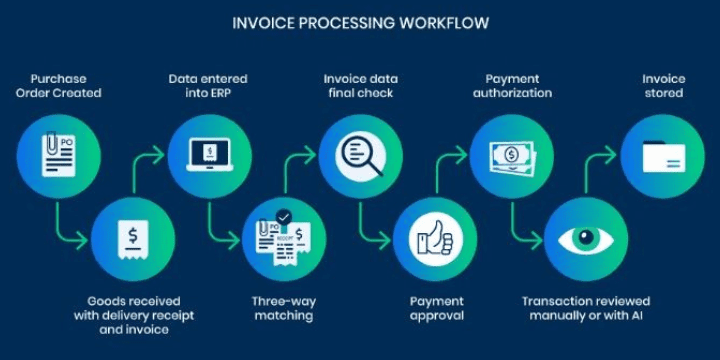
Invoice handling’s how companies deal with bills coming in from sellers or service providers. Using smart tools, these bills get read by software, checked for accuracy, then signed off without manual work – slashing clutter and errors along the way. It speeds things up so payments go out on time, which keeps suppliers happy while helping money move smoothly in return.
Why Expense Approvals Matter
Expense checks keep company costs under control while matching set rules. When using digital tools, bosses can look over requests fast – no matter the gadget they’re on. These setups log each payment step by step, which simplifies reviews and money monitoring.
How Workflow Automation Helps
Putting invoice handling together with spending checks in a single process helps companies skip double-handling tasks. Tools that run on their own pull out details, link them to order records, then send everything off for sign-off right away. Fewer mistakes happen because of people, plus workers get paid back faster.
The Business Impact
Once teams stop chasing invoice payments or sitting around for sign-offs, things start moving without hiccups. Finance crews see where money’s going as it happens, whereas staff get their expense cash quicker than before. This leads to tighter oversight, clearer insight on workflows, along with a noticeable bump in output company-wide.
Handling invoices and approving costs automatically means more than working faster – it’s about thinking clearer when spending money. By smoothing out tasks, companies get room to expand rather than shuffle documents.
4. Customer Support Ticket Routing

Customer support ticket routing speeds things up by getting issues to the correct agent without delays. Rather than handing out tickets one by one, automatic systems push them straight to the right spot. That way, people needing help don’t wait long, while staff handle tasks that match their skills.
What Is Customer Support Ticket Routing?
It’s a system that sorts customer messages by set conditions – say, subject, priority, or who can handle it best. Technical stuff heads straight to IT, billing troubles get sent to finance, while basic queries land at reception.
When there’s no routing, handling customer requests turns chaotic. Messages stack fast while replies drag on, so people grow frustrated. Using smart routing means each inquiry goes straight to the correct person without delay, boosting response times and user happiness.
How It Works
Today’s support software checks new messages using smart routines. With artificial brains, it spots key terms, mood, or issue category – then routes the case to the best-suited helper. As days go by, it picks up patterns and gets sharper at sorting.
Benefits for Your Business
Ticket routing cuts down on delays while lowering mistakes made by hand. Yet it speeds up replies, even spreading tasks fairly between staff – nobody gets swamped. That means folks who call in leave satisfied, whereas the help crew works smoother without burnout.
Best Tools for Ticket Routing
Popular tools such as Zendesk, Freshdesk, or Help Scout come with automatic ticket handling right from the start. Setting them up doesn’t take much effort, yet they grow alongside your company.
Final Thoughts
Shifting tickets to the right agent quietly changes everything. When tasks run on autopilot, response times drop while service feels sharper and more tailored for each person reaching out.
5. Social Media & Content Posting Automation
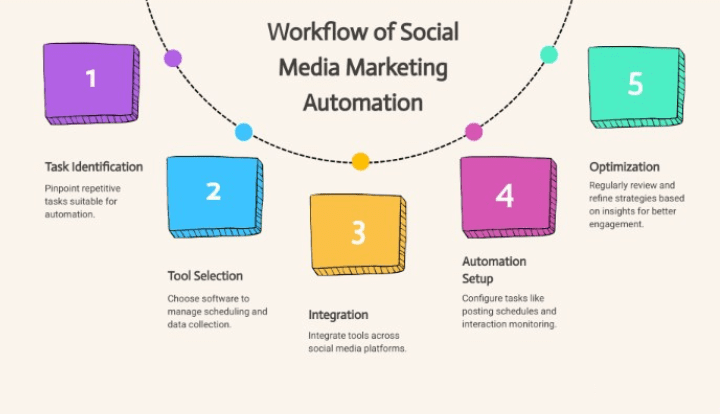
Handling a bunch of social media profiles? It’s tough. Sharing posts when it matters, coming up with fresh stuff every day – this eats up your time. But here’s the fix: smart tools that do some work for you. Instead of juggling tasks across apps, these helpers keep things running smooth while you stay on track.
What Is Social Media Automation?
With social media business process automation tools, apps help you line up posts ahead of time. Rather than sharing stuff each day by hand, pick what goes live when – software takes care of hitting publish later.
Faceless youtube automation cuts down effort, lowers errors, while keeping your name visible online – even if you’re tied up. It makes sure people keep getting new posts, also supports steady posting no matter where you show up.
How It Works
You make your updates, toss in descriptions, tags, or visuals – then pick ideal moments to share. Using a smart helper, they go live by themselves across sites like Facebook, Instagram, X (formerly Twitter), LinkedIn, even TikTok.
Popular Tools for Automation
Tools such as Buffer, Hootsuite, Later, or Metricool get used a lot since they give easy-to-use layouts, performance stats, along with posting schedules. Track how people interact, figure out which stuff hits well, then tweak your posts without hassle.
Benefits of Automated Posting
Automation puts you in charge while giving you extra room to think outside the box. Focus shifts toward crafting stronger posts rather than stressing over timing them right. With nonstop updates handled automatically, companies see steady gains from always-on profiles.
Best Practices
Think ahead when scheduling your posts. Stick to a steady voice across updates, blend helpful tips with fun stuff now and then, while checking results every seven days. Don’t rely too much on bots – even if things run smooth, answer DMs and comments yourself once in a while so people feel heard.
Final Thoughts
Social media plus scheduled updates matter big-time in today’s outreach game. They keep your vibe visible, free up hours, while letting your name stand out from others chasing likes. If you run shops, push messages, or make stuff online, setting posts on autopilot is simply how you grow smarter without burning out.
6. Inventory Replenishment & Ordering
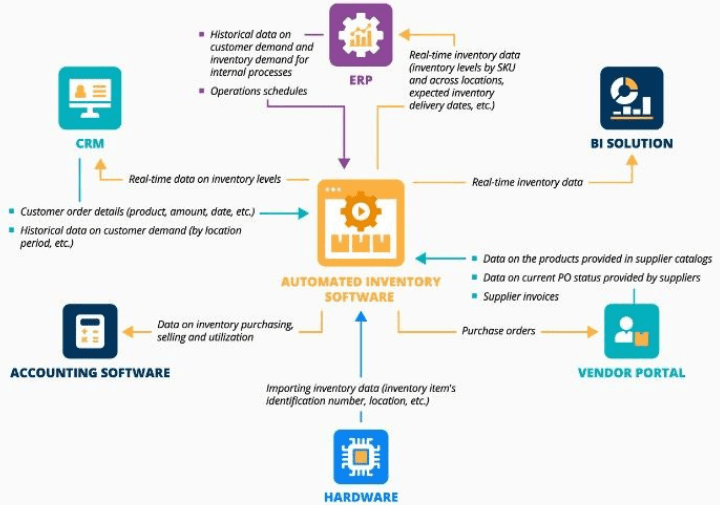
Keeping shelves stocked shapes how well a company runs day to day. When items are on hand as shoppers want them, stores skip empty-shelf moments plus missed income chances. Firms nailing this flow stay in step with what’s coming in versus going out – slashing expenses while boosting buyer happiness.
Why Inventory Replenishment Matters
Good restocking keeps companies from piling up too much stock or running short. Too much inventory blocks money and takes room, whereas too little annoys buyers and damages trust. Smart refill methods help firms time their orders, guess customer needs, stay alert when trends shift.
Common Inventory Replenishment Methods
Some folks handle restocking by setting low-level alerts that spark purchases once supplies dip below a threshold. A few go for lean supply tactics, bringing in goods exactly when they’re about to run out. Picking what works best comes down to how the shop runs and how often customers buy. Different needs call for different strategies based on real usage instead of guesses.
How Technology Helps
Today’s stock apps make restocking easier through smart tracking. They monitor supplies while predicting what you’ll need later – triggering automatic reorders when needed. Companies gain extra hours in their day, lower mistakes from manual work, yet boost accuracy in planning with these tech helpers.
Improving Ordering Accuracy
Picking the right amounts cuts down leftovers while making sure folks receive their correct items. When companies check how sales are going or how well vendors deliver, they tweak when and how much to buy. Staying close with providers keeps things moving on schedule without hiccups now and then.
Final Thoughts
Restocking isn’t simply about filling shelves again; it’s a careful move matching what people want with spending wisely and keeping things running smooth. Companies using clever reorder methods often see better profits, happier buyers, while moving faster than rivals stuck in old ways.
7. Contract & Supplier Onboarding Automation
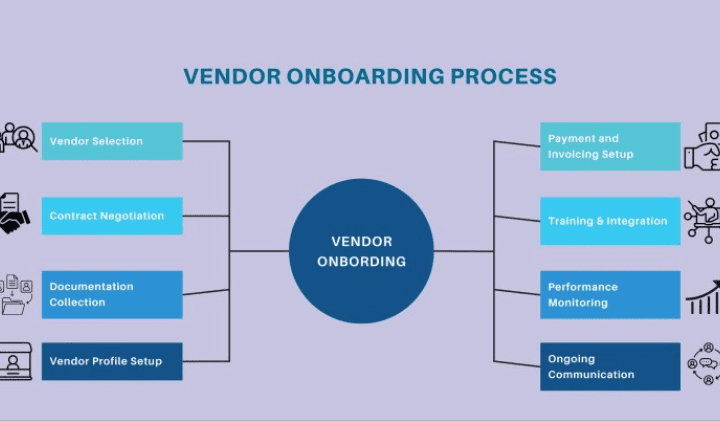
Dealing with contracts and vendors by hand usually takes too long and leads to mistakes. Companies regularly run into holdups, mixed messages, or issues following rules. Automating how you bring in contracts and suppliers fixes these problems by making everything smoother. This way, firms handle agreements better, sign off on providers quicker, while cutting down clutter. Using tech here doesn’t just free up hours – it also builds stronger connections with partners.
How Workflow Automation Improves Contract Management
Auto handling of contracts means each one moves smoothly through checks and approvals – no waiting around for people to act. With built-in deadline tracking, teams get warnings when deals are up for renewal while documents stay safe in digital storage. Finding a specific agreement takes seconds, plus staying on top of rules becomes way easier. Fewer surprises pop up, and everyone sees how things move from start to finish.
Simplifying Supplier Onboarding
Supplier onboarding automation lets firms add new vendors fast while keeping things correct. With it, needed paperwork gets gathered and confirmed by system rules instead of people. Firms review credentials, payout info, or potential risks through automated checks. That pushes buying steps forward quicker – fewer slipups pop up compared to hand-done tasks.
Benefits for Business Operations
Automation speeds up how contracts and vendors join the system while cutting down expenses and keeping things within rules. Workers get more time for big-picture work rather than doing the same admin stuff over again. Suppliers feel supported because everything runs smoother, which strengthens relationships over time. Steps stay uniform, quicker, yet far less likely to go wrong.
For expanding businesses, automating contract and supplier setup isn’t a luxury anymore. It cuts through clutter in daily tasks while lowering chances of mistakes. Firms using these tools handle vendors and agreements with better control, boosting consistency and speed behind the scenes.
8. Employee Leave & Attendance Management
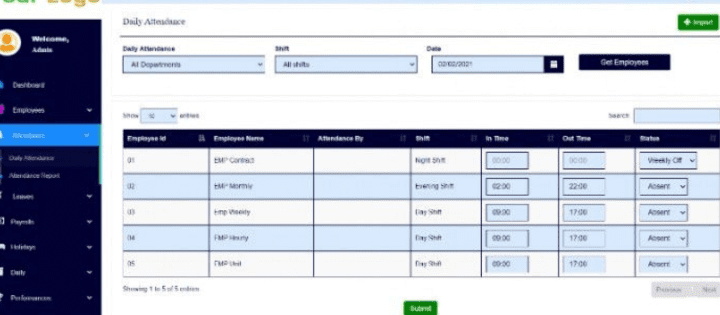
Running a business smoothly means keeping track of who’s working and who isn’t. When there’s no solid way to log time off or shifts, things quickly get messy. Instead of doing it all by hand, lots of workplaces now use smart tools that handle absences automatically – making sure records stay correct without extra effort.
Why Leave and Attendance Management Matters
A solid time-off and check-in setup keeps things fair and clear. Workers are aware precisely of their available days off, whereas supervisors handle approvals without mix-ups. That way, pay mistakes drop, also making it easier to organize shifts smoothly.
Common Challenges in Manual Tracking
Some companies keep using old-school methods like paper sheets or Excel files. That way, workers’ time-off slips might get lost easily. Mistakes in clock-ins happen more than you’d think. Tracking stuff by hand takes up hours while boosting chances for mix-ups. These hiccups slow things down and sometimes even annoy staff.
Features of Modern Systems
Folks clock in digitally, so time records update live – no waiting around. Requests for days off go through fast, cutting out paperwork hassles. When teams need breaks, they see exactly how much time’s left without asking anyone. Bosses pull up summaries anytime, helping them shift people where needed. Payroll hooks right into it, so no double-checking hours by hand.
Benefits for best workflow management software Businesses and Employees
A digital workflow automation setup helps HR move faster while cutting down mistakes – on top of making responsibilities clearer. Workers get easier access plus straightforward info about hours logged and days off left. That kind of reliability lifts spirits along with confidence across the team.
Choosing the Right Solution
Choosing a time-off and tracking tool? Go for something easy that can adapt. It’s gotta match how many people you’ve got, work alongside what you already use, yet still show results plainly. If it runs online, folks can check in from any location – super handy when some work downtown while others log in from abroad.
Making sure time off and attendance are handled well isn’t only about HR anymore – it actually helps teams get more done while keeping people happy. Using a solid setup cuts down on mistakes, frees up hours, plus makes the workplace feel more open and balanced.
9. Compliance & Audit-Ready Reporting
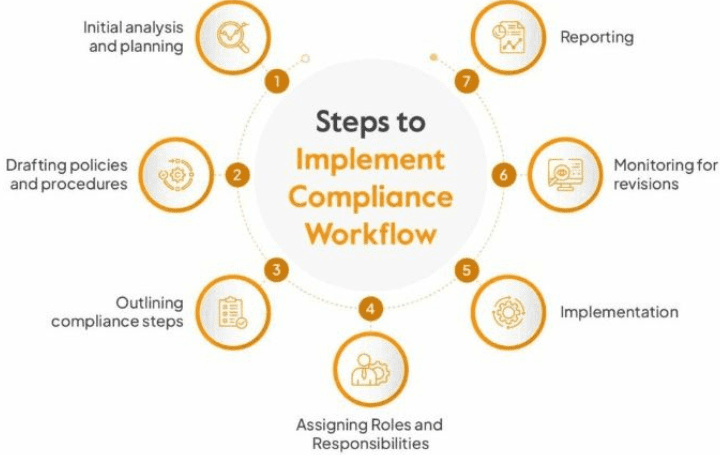
In today’s quick-moving work scene, keeping up with rules isn’t only about laws – it builds trust while cutting waste. Because clear records show proof of following standards, firms can monitor actions without guesswork. Firms focusing here gain back hours, make fewer mistakes, skip big fines.
Understanding Compliance Reporting
Compliance reporting makes sure a company follows every rule it’s supposed to. Whether it’s tax checks or sector rules, clear reports tell investors the business is open about how it works. Plus, spotting weak spots early keeps small problems from turning into big messes.
The Role of Audit-Ready Reports
Audit-ready reports take things up a notch – not only storing info, but sorting it neatly so it’s always within reach when required. Because everything’s lined up right, audits feel less overwhelming while leaders use live updates to guide their next moves.
Benefits for Businesses
Trust grows when clients, investors, or regulators see clear compliance reports. Fines get avoided since everything runs out in the open, no hidden steps. Companies using ready-for-audit setups find daily tasks flow better – info sits right there, correct, recorded, quick to grab.
Choosing the Right Tools
Nowadays companies rely on auto-reporting software to handle rules easier. Such programs pull info from various platforms, sort it based on legal guidelines, yet produce summaries right away. Using bots cuts down mistakes people make while keeping updates steady plus trustworthy.
Staying on track with rules isn’t just nice to have – these days, it’s essential for any business that wants to thrive. Firms focusing on solid reporting don’t just move faster – they build clarity and credibility while standing out where it counts.
10. Data & Reporting Automation
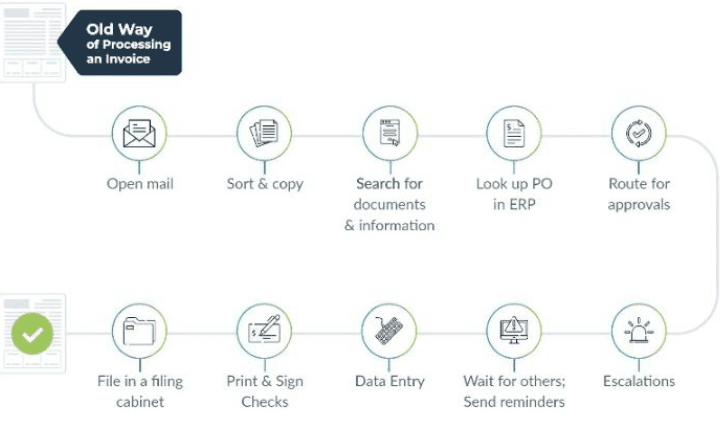
Data plus reporting automation’s changing how firms deal with info. Rather than putting together reports by hand, companies can now set up systems to gather, study, and show data automatically. That shaves off hours while cutting down mistakes – so teams pick better moves without delay.
Doing reports by hand often takes too long, while also risking errors. With automated tools, info stays fresh plus correct at all times. Workers get to spend time studying results instead of stuck building tables all day. That shift boosts efficiency – also sharpens how decisions are made.
Key Features of Reporting workflow Automation
Nowadays, automatic report systems link up with various info spots, tidy up messy numbers, sort them out – then spit out live-updating screens. They usually pack stuff like timed updates, changeable layouts, or clickable charts instead of static images. This setup flows smoothly, bringing clear takeaways while skipping the hands-on grind.
Benefits for Businesses
Companies that use automatic reports get clear benefits. Faster info becomes available, mistakes drop because people aren’t doing it by hand, while choices turn smarter over time. Work feels easier since machines take care of routine work – so teams can put energy into what really matters.
Choosing the Right Tool
Picking the right workflow automation tools comes down to what your business actually requires. Go for options that connect smoothly with current software, keep data safe, yet allow custom reports. Choose ones that feel intuitive, grow as you do – those tend to work out better over time.
Future of Data & Reporting
With tech moving forward, automated reports keep changing too. Thanks to smarter algorithms, forecasts and data analysis get sharper over time. Firms jumping on this trend sooner gain better results when it comes to speed and choices.
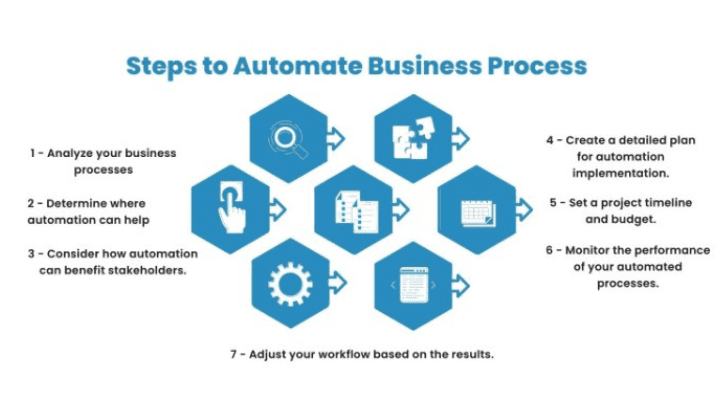
How to Get Started with Workflow Automation
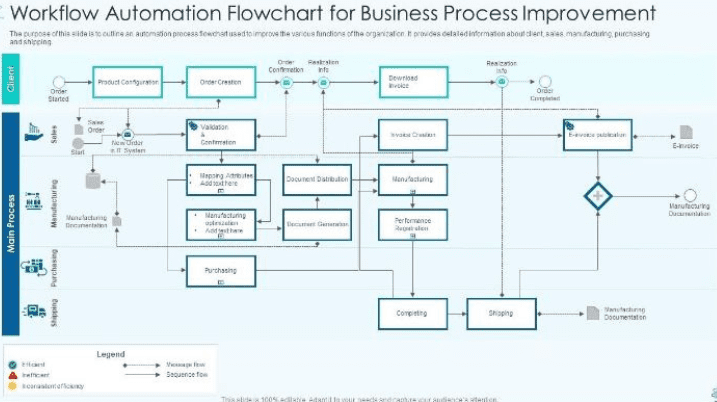
Here’s a basic plan:
1. Map Your Processes
Start by figuring out what jobs you do over and again that take too long or often go wrong. Write down each move involved.
2. Choose the Right Tools
For small setups, try basic apps; if things grow, shift toward linked services or built-in features instead.
3. Prioritize Use Cases
Begin with something tiny. Choose a single task – useful but safe – to handle automatically at first, like time-off forms. After that, grow bit by bit.
4. Design & Test the Workflow
Set off actions, lay out moves, add checkpoints, send alerts. Try it out to see if everything runs right.
5. Train Your Team & Monitor Results
Make sure each person gets how the updated method runs. Keep an eye on results while collecting opinions – then tweak things.
6. Scale & Refine
Workflow automation getting one task running on its own, use what you figured out for other tasks – this slowly shapes how your team works. Over time, it becomes normal to set things up this way.
Common Mistakes to Avoid
Fix things before you speed them up. When tasks are chaotic, doing them faster just spreads the mess – handle that upfront.
Skipping clear responsibility means no one’s in charge. One person should handle the workflow automation while keeping an eye on how it runs.
Fine, skip the outliers. Every now and then a process hits a weird snag – figure out what happens when it does.
Jumping into full work automation early can backfire. Try small steps instead – steady progress keeps things moving forward.
No clear way to measure results. Pick numbers that matter, then watch how your automated tasks change things – like cutting down hours spent or lowering mistakes made.
Automation’s no longer just nice to have – it’s essential if you’re aiming to keep things running smooth, stay ahead of rivals, or adapt fast. Whether it’s bringing new hires onboard or pulling together reports, each of the ten automation tips shared here could reshape how your work gets done while giving your crew more room to tackle high-impact tasks. Begin with something tiny, track what happens, then grow from there. Skip the delay – pick a single process right now to automate and see shifts start piling up.
If you got something from this piece, drop a line underneath telling me what automated trick you’re trying out first – or toss in any hurdles popping up – happy to read how things go.
FAQ
How do I choose which workflow to automate first?
Check for jobs you do often, take too long, mess up easily, or follow set rules. Doing these automatically pays off well.
Will workflow automation replace employees?
Not really. Machines handle repetitive tasks – freeing up people to tackle planning, original ideas, or tough calls. Instead of swapping out workers, tech backs them up.
Do I need expensive software to start automation?
It doesn’t always work out that way. Plenty of apps provide cheap ways to automate stuff. What matters is picking one that fits what you already use – then begin with something tiny but useful.